Record a user flow into Figma
Last updated
A single screen rarely tells the whole story. Record Flow captures a journey as you click through it (onboarding, a checkout, a settings panel) and exports every state as an editable Figma frame. It’s the quickest way to map an existing product’s UX, audit a flow or benchmark a competitor.
How to record a flow
- Open the page where the journey starts and click the html.to.design icon.
- Tick the viewports and themes you want each step captured in.
- Click Record Flow. The first step is taken right away and the flow toolbar appears at the bottom of the page.
- Click through the page as a user would. Each click that changes the page becomes a step.
- Click Export N steps, then choose what to do with the capture: copy, send to the Figma plugin, or download.
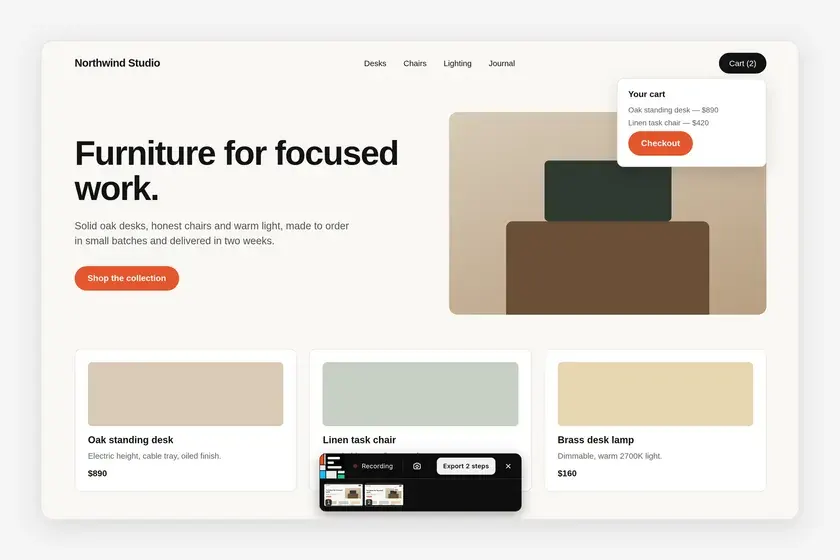
The flow toolbar
- Recording / Paused: click it to pause the recording, for example to click around without adding steps, and again to resume.
- Camera: Capture this state now, for a state no click led to, such as a hover or a scrolled carousel.
- Export N steps: ends the recording and opens the output choices.
- ×: Stop and discard the recording.
- Steps: one thumbnail per step.
Good to know
- When the flow reaches a website the extension can’t access yet, recording goes on hold. Choose Allow on <site>, Keep recording here, or export the steps you have.
- The popup shows the recording’s progress, Recording a flow (N steps), if you open it while you click.
Frequently asked questions
What counts as a step in a recorded flow?
Any click that changes the page, such as opening a menu, switching a tab, a client-side route change or a navigation to a new page. Clicks that change nothing are not recorded. You can also add the current state yourself with the camera button.
Can a flow span several pages or websites?
Yes. The recording follows you to new pages. On a website the extension has no access to yet, recording pauses until you allow it.
Is each step captured in every viewport?
Yes. Each step is captured in every viewport and theme ticked in the popup.