Capture part of a page with Capture Selection
Last updated
Only need the header, a pricing table or a product card? Capture Selection lets you pick elements right on the page and import only those into Figma.
How to capture a selection
- Open the page and click the html.to.design icon in your browser toolbar.
- Click Capture Selection, or press Alt+Shift+D (⌥⇧D on Mac) without opening the popup.
- Move your mouse over the page: the element under it is highlighted. Click to capture it.
- To capture several elements, hold Shift and click each of them, then click the toolbar’s button, for example Copy 2 elements.
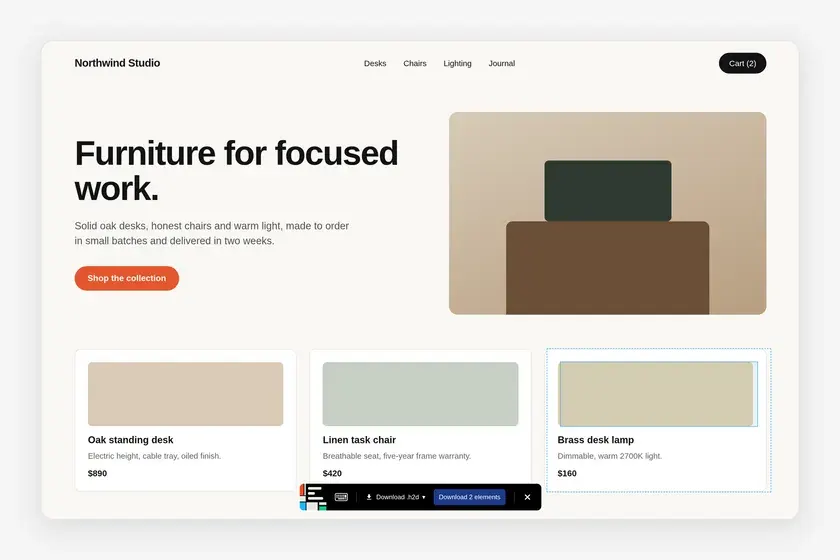
The selection toolbar
The black toolbar at the bottom of the page drives the capture.
- Action menu: choose what happens to the selection, from Send to Figma, Copy to clipboard, Download .h2d and Download .make. Your last choice is remembered. Copy is the default when you’re signed in, .h2d otherwise.
- Gear: with Copy to clipboard, turns Autolayout on or off for the paste.
- Keyboard icon: hover it to see the shortcuts below.
- ×: stops the selection.
Selection shortcuts
| Shortcut | What it does |
|---|---|
| Hold Shift | Capture multiple elements |
| Hold ⌥ Option / Alt | Click the page (open a menu, switch a tab) without capturing |
| Hold ⌘ Cmd / Ctrl | Disable mouse events on the page |
| \ or Shift+Enter | Select the parent element |
| Enter | Select the children |
| Esc | Cancel |
💡 Hovering the wrong element, a wrapper that is too big or a text that is too small? Use \ and Enter to climb up or down the page structure until the highlight frames exactly what you want.
Frequently asked questions
Can I capture several elements at once?
Yes. Hold Shift and click each element. The toolbar's button then shows how many elements it will copy, send or download.
Can I select an element inside an iframe?
Yes. Capture Selection works inside embedded frames too. For a large frame from another domain, the extension asks for access to that site first.
How do I click a menu or a tab without capturing it?
Hold Option (Mac) or Alt (Windows) while you click. The page reacts as usual and nothing is selected.