Copy-paste from Chrome to Figma. New extension update!
Our html.to.design browser extension has always been the must-have companion to the Figma plugin — your secret weapon for importing private, local, or complex webpages into Figma with ease. Since launch, hundreds of thousands of designers have relied on it to bridge the gap between the live web and their design workflow.
But we’re always looking for ways to make your workflow faster and more powerful. Today, we’re excited to introduce a new and improved version of the html.to.design browser extension — one that makes importing websites into Figma smoother than ever.
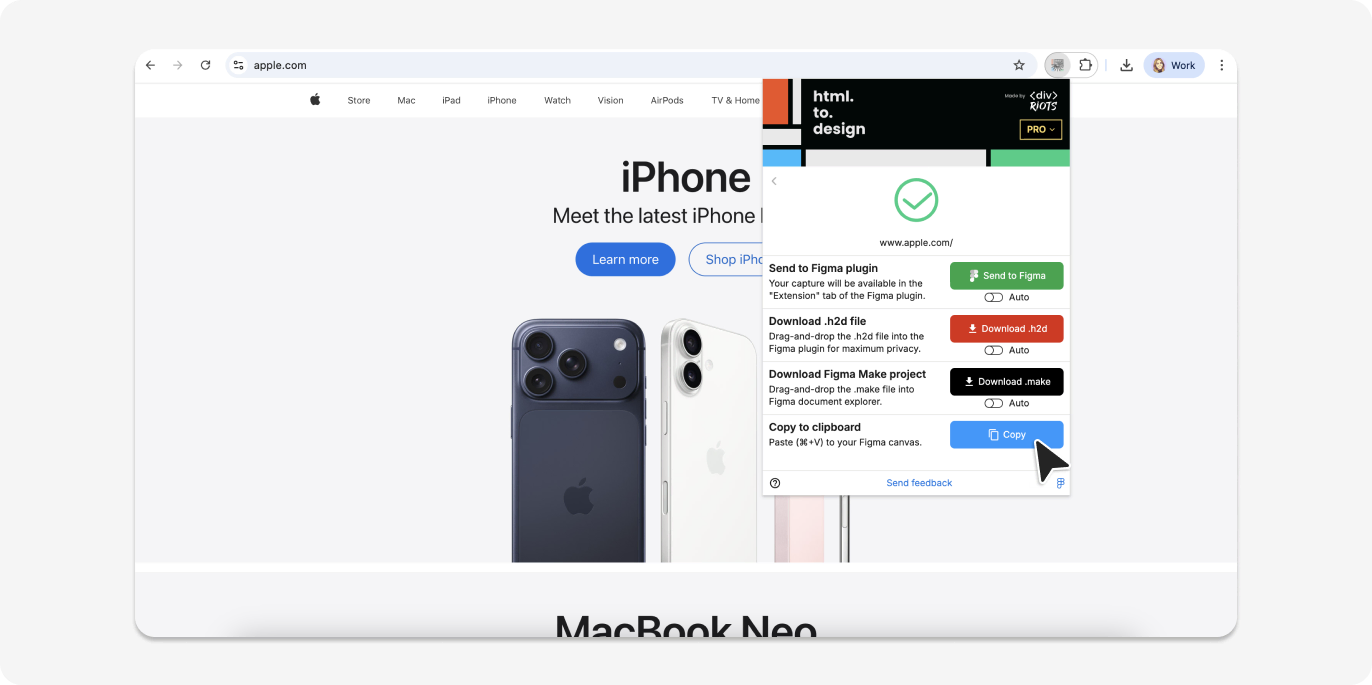
New in the extension: Copy to clipboard 📋
Importing captured websites into Figma is now as easy as Copy-Paste.
After capturing a page with the extension, simply select the new Copy to clipboard option. Then switch to Figma and paste (⌘+V) — that’s it. Your design lands directly on the canvas without ever needing to open the plugin.
This is a game-changer for quick inspections, ad-hoc imports, or any time you want to move fast without breaking your flow. It’s the fastest path from a live webpage to a Figma frame we’ve ever shipped.
How it works:
- Open the extension on any webpage
- Capture the page as usual
- Click “Copy to clipboard”
- Switch to Figma and press ⌘+V to paste
Try it out
Ready to try out the new extension? Install or update the html.to.design browser extension, open any webpage you want to bring into Figma and capture it as always. You’ll then see the new Copy to clipboard option so you can paste (⌘+V) your captured webpage directly into Figma.
With this new update, you’ll be importing webpages into Figma faster than ever!